Quick reference guide

Build your first workflow

By the end you will have a saved, versioned workflow graph you can launch an instance from.
About 5 minutes

Before you start

The steps

A User Interaction node opened in the editor in the Hartwell demo workspace, which is example data, showing the assignment, task settings, exit ports and fields a node carries.
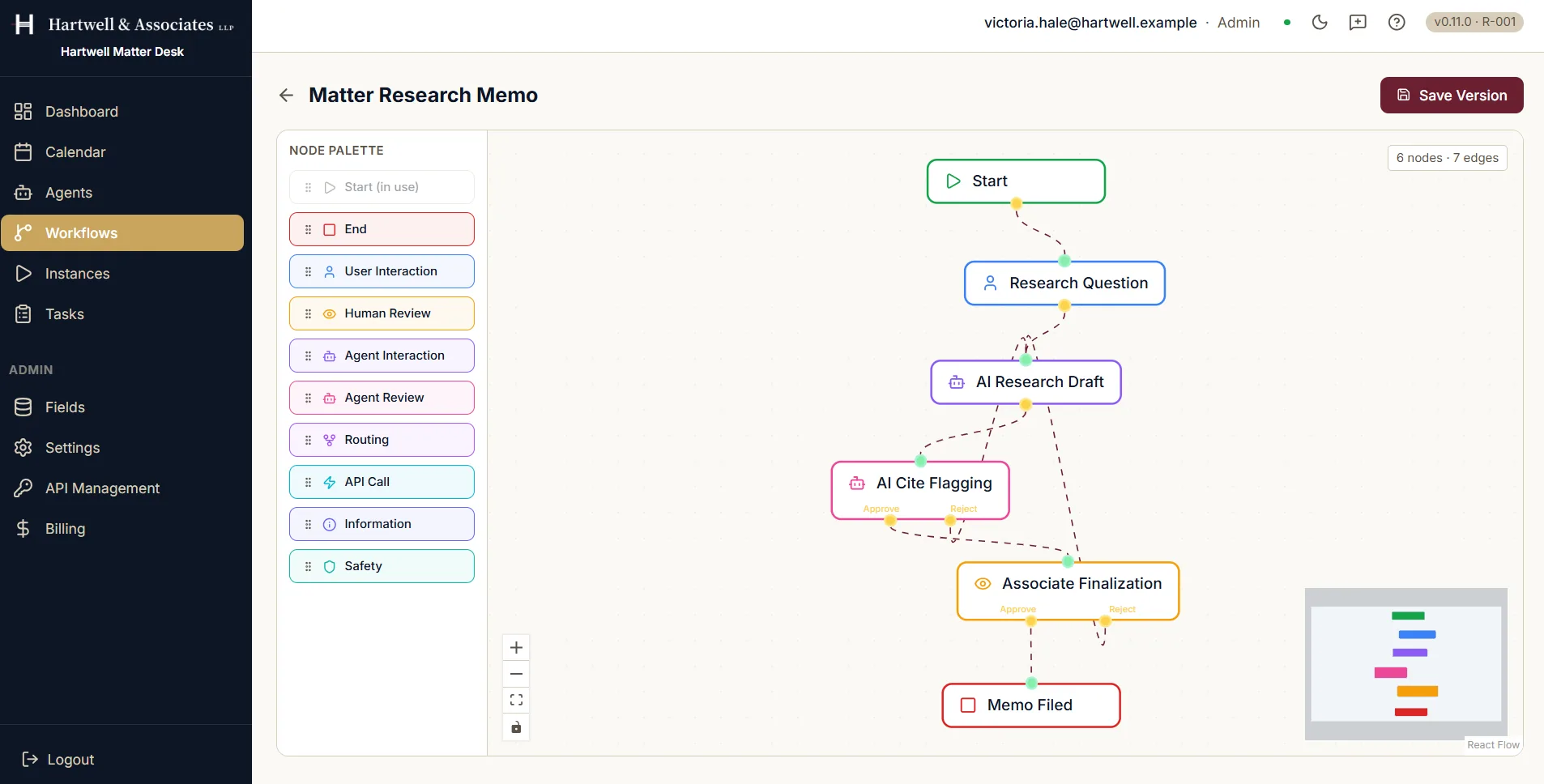
The Dave workflow editor. A node palette on the left lists Start, marked in use, then End, User Interaction, Human Review, Agent Interaction, Agent Review, Routing, API Call, Information and Safety. The canvas in the centre holds a Start node connected through Research Question and AI Research Draft to AI Cite Flagging and Associate Finalization, each of those offering an approve and a reject path, and finally to Memo Filed. A Save Version button sits in the top right and a badge reads six nodes and seven edges.

The editor, with the palette on the left and the canvas in the centre. Demo workspace with example data.

Where to go next

Adapted from the in-product help centre, which stays the fuller reference. For how to raise anything this guide does not cover, see the Support Hub.
Build Your First Workflow in Dave: A Quick Reference Guide | Dave