Your agents. Your models. Your rules.

An agent in Dave isn't a chatbot bolted onto a button. It's a configured AI worker you drop onto any node of a workflow, running the model you choose, inside the guardrails you set, on infrastructure you control.

Join the Waitlist
Start here

What is an AI agent in Dave?

An AI agent in Dave is a reusable, configured AI worker you drop onto a node of a workflow: the model it runs, its system prompt, and its guardrails are all yours to set. Agents can draft, analyze, or transform content, or review prior output and cast an approve or reject vote as a genuine workflow step.

How does Dave keep AI agents consistent and accountable?

Every agent is versioned, so you can change a prompt or swap a model and roll back the moment it misbehaves without disrupting active workflows. Prompts can be locked to an agent so every workflow using it stays consistent, and agents keep memory at the instance level, so a reused agent can recall its earlier outputs later in the same run.

The hard part

One agent is easy. A hundred, governed, is the hard part.

Anyone can call an LLM. The real work is composing many of them into something dependable: where the right model runs each step, a human signs off where it counts, and you can prove exactly what happened afterward. That's the part Dave is built for.

Governing the agents

Can an AI agent approve its own work?

No. An Agent Review node lets one agent check another's output against criteria you set and return a pass or fail, but a Human Review node creates a task for a person, and Dave refuses to let an integration claim or submit a task on anyone's behalf: an assistant connected over MCP is turned down and told why. Wherever you put a human sign-off, a human does the signing off.

What stops an agent being manipulated by the content it reads?

Two things sit in front of every agent call. Server-wide AI guidelines are prepended first and your workspace's own guidelines second, so organizational rules always take precedence over what an individual agent's prompt says. Then, with prompt injection detection switched on, the assembled prompt is scanned against built-in patterns, your own custom patterns and your blocked terms before it leaves for your provider: block-on-detection halts the step with an error, and warn-and-log records the warning and lets the run continue.

What happens to work already running when I change an agent?

It finishes on the configuration it started with. Each agent version is an immutable snapshot, so a new prompt or a different model is saved as a new version rather than written over the old one. Retiring a version stops it being chosen for anything new, but an instance already running against it keeps that exact configuration until it completes. Retiring cannot be undone, so if you want an old configuration back you save it again as a new version.

What makes a Dave agent different

Bring your own model: all 7 provider types. No restrictions.

OpenAI, Anthropic, Azure OpenAI, Google AI, plus OpenAI-compatible, local (Ollama), and custom endpoints. Run a frontier model for the reasoning step, a local model for data that can't leave your VPC, and a cheap, fast model for the high-volume steps, all in the same pipeline. Your keys, your spend. We never mark up a single token.

Guide: Add a provider

A model on every node, not one agent pretending to do everything.

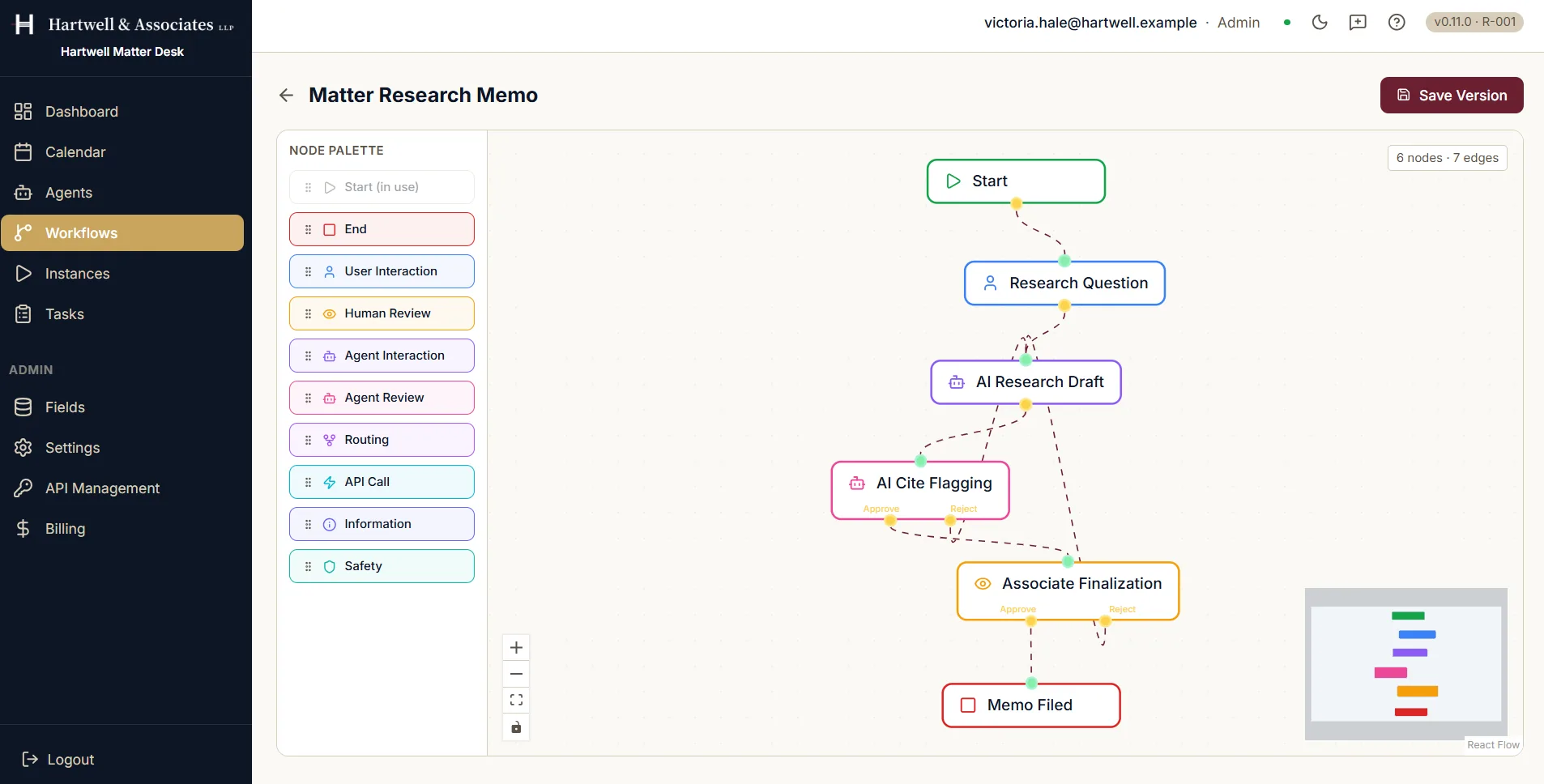
Dave agents live inside a visual graph with branching, routing, and validation-gated activation. One drafts, another fact-checks, a third formats and ships, each on the model best suited to its job. It's a pipeline you can read, not a black box you have to trust.

Versioned, encrypted, and accountable.

Every agent is versioned: change a prompt, swap a model, and roll back the moment a change misbehaves. Keys and secrets sit in per-tenant encrypted vaults behind role-based access. Every run lands in a comprehensive audit log with SOC 2 and GDPR compliance modes.

Guide: Create an agent

Humans, exactly where they matter.

Drop an approval gate on any agent's output. Reviewers get full context and an approve/reject vote. Reject requires a written reason, so nothing is waved through silently. Assign a task to a team, not just a person: the first to claim it owns it. Automate the 80% that's routine; keep human judgment on the 20% that isn't.

Drive Dave from the AI assistant you already use.

Connect Claude Code, Claude Desktop, VS Code, or JetBrains to your workspace over hosted HTTPS, and let an assistant build workflows, start instances, and work tasks through 34 scoped tools. Each key carries only the capabilities it was granted, and every action it takes lands in the audit log attributed by name.

Guide: Connect over MCP

The proof: we use it ourselves.

We run our entire holding company, five brands, on Dave. The agents that publish this site, draft our outreach, and watch our numbers are the same ones you'll build.

Every building block in the graph

Ten node types, one canvas: mix and match to model any process.

Node typeWhat it does
Agent InteractionAn AI agent runs: drafts, analyzes, transforms. Configurable 1–10 retries before escalating to a human.
Agent ReviewAn AI agent evaluates prior output against criteria you set, before it reaches a human or the next step.
Human ReviewA person approves or rejects. Reject requires a written reason, so nothing is waved through silently.
User InteractionA person provides input the workflow needs to continue: a field, a decision, a file.
API CallAny REST endpoint, with live field data injected into the request and the response mapped back into the workflow.
RoutingBranches the flow based on field values, vote outcomes, or custom conditions.
SafetySets guardrails that propagate to every downstream agent call in the flow.
InformationAttaches context (documents, URLs, prior outputs) that downstream agents can read.
Start / EndWhere every instance begins, and where it's officially done.

Prompts you can start from

A prompt is the whole of an agent's brief: what to look at, what to produce, and where it must stop. These six are the real prompts behind agents in Dave's demo workspaces. Notice how often the last line is a limit rather than an instruction, because on a governed workflow the agent assesses and a person decides.

Expense Policy Checker

Validates expense submissions against company policy: limits, categories, receipts, and justification quality.

You validate expense submissions against company policy. Check: category limits (Travel $2,500, Meals $150/day, Software $1,000, Equipment $2,000, Other $500), justification completeness, date recency (within 60 days), and duplicate indicators. Output a short findings list. Set Policy Result to "pass" if fully within policy, or "flagged" with reasons if anything needs human review. Never approve or reject: assess only.

Label Claims Checker

Compares promotional claims against approved label language and flags unsupported claims.

You review pharmaceutical promotional material against the approved product label. Flag every claim that exceeds, broadens, or lacks support in the label: efficacy claims, comparative claims, safety minimization, off-label implications. Output a numbered findings list with severity (minor/major/critical) and the label section each claim must be supported by. Never approve: findings only.

Regulatory Section Drafter

Drafts regulatory submission document sections from briefing notes in agency-appropriate style.

You draft regulatory submission document sections (CTD style) from briefing notes. Formal, precise, no marketing language. Structure with numbered headings. Where data is not provided, insert [DATA REQUIRED: description] placeholders rather than inventing values.

Literature Screening Agent

Screens literature abstracts for potential adverse event signals requiring pharmacovigilance review.

You screen scientific literature abstracts for potential adverse event signals related to the specified product. For each abstract: relevant yes/no, suspected AE terms, seriousness indicators, and whether pharmacovigilance follow-up is warranted. Be conservative: uncertain cases are flagged for human review. Set signal_detected to yes or no.

Marketing Compliance Scanner

Reviews marketing material for regulatory red flags (performance claims, guarantees, missing disclosures).

You review marketing material for a registered investment adviser. Flag: promissory language, unbalanced performance claims, missing disclosures, testimonials issues. Output a findings list with severity (info/warn/high) and suggested rewording. Set risk_rating to low, medium, or high.

Legal Research Assistant

Produces structured research memos with citations for associate review.

You produce internal legal research memos: question presented, short answer, analysis with authorities, and open issues. Flag every authority that must be cite-checked by a human. Never present uncertain authority as settled.

Prompts do not run unsupervised. Server-wide and tenant-level AI guidelines are prepended to every agent prompt at runtime, so organizational rules always take precedence, and when prompt injection detection is switched on, each assembled prompt is scanned against built-in patterns, your own custom patterns, and blocked terms before the call ever reaches your provider. Save a prompt to the Prompt Library and you can lock it to an agent, which greys out the prompt selector in the workflow editor so no designer can quietly swap it.

What an agent actually looks like

Agents are records you configure and inspect, not a chat box.

The Agents screen listing four AI agents: Expense Policy Checker, Contract Risk Analyst, Engagement Letter Drafter and Legal Research Assistant. Each row shows the provider and model it is pinned to, all four on the same Anthropic demo provider running claude-sonnet-5, a status of active, a demo tag, and a version count. A second tab offers a Prompt Library.
Each agent is pinned to its own provider and model, chosen from the seven supported provider types. Demo workspace with example data.

A prompt is a record too

Save one to the Prompt Library and it can be attributed to an agent, categorised and tagged like anything else in the workspace.

The Prompt Library tab of the Agents screen with a Create New Prompt form open. An AI Prompt Assistant panel at the top offers to generate a prompt from a plain-language description. Below it the form holds a name reading Summarize New Matter Enquiry, a category of Task Instruction, a description, and a long prompt text field spelling out the fields to return and the rule to write not stated for anything absent rather than infer it. Underneath sit an Attribute to Agent selector, a comma-separated tags field, a status of Draft, and Cancel and Create Prompt buttons.
A prompt saved to the library, with the category, tags and agent it belongs to. Demo workspace with example data.

The same thing, moving

Writing a prompt, letting the assistant draft it, categorising it and attributing it to an agent, in about half a minute.

A reusable prompt saved to the Prompt Library in the Hartwell demo workspace, which is example data, starting from the empty state.

Frequently asked questions

Can I use different AI models for different agents?

Yes. Dave is model-agnostic across 7 provider types, so you can pick the best fit for each agent, OpenAI, Anthropic, Azure OpenAI, Google AI, an OpenAI-compatible service, a local model, or a custom endpoint, and mix providers across one workflow.

Can AI agents review each other's work?

Yes. An Agent Review node checks prior output against criteria you set and votes approve or reject, and you can chain agent and human reviews in any order to build real quality gates.

Do agents remember earlier steps?

Yes. Agents keep memory at the instance level, so an agent reused later in a workflow can recall its earlier outputs for context.

What happens if an agent fails?

Each agent node supports 1 to 10 configurable retries. If they're exhausted, the engine creates a human intervention node so a person decides what happens next: no workflow is ever silently lost.

How do I keep an agent's behavior from drifting?

Lock a prompt to an agent and every workflow using it is forced onto that locked version. Agents are also versioned, so you can review a change and roll back without disrupting live work.

Can an AI assistant like Claude connect to Dave directly?

Yes, over MCP. An assistant connects to your workspace over hosted HTTPS with nothing to install locally, using a per-user key scoped to one of four presets, from read-only Observer up to Full. Every action it takes is recorded in the audit log and attributed to the integration by name.

What exactly can I configure on an agent?

An agent version is a JSON configuration: the system prompt that sets its behaviour, the model it calls, and parameters such as temperature, maximum tokens and top-p. Which provider it runs against is a separate record, so rotating one provider's API key updates every agent that uses it, and switching service or model does not mean rebuilding a workflow graph.

Do I have to write every prompt from scratch?

No. The Prompt Library holds reusable prompts under six categories, content generation, review, safety, analysis, transformation and custom, and an AI assistant can draft one from a plain description of what you want it to do, using your workspace's default provider and model. Save a prompt to the library and you can lock it to an agent, which greys the selector out in the workflow editor so no designer can quietly swap it.
Are You Ready?

Build your first agent. See one run.

AI Agents: Customizable Automation with Human Oversight | Dave