Quick reference guide

Set up a custom field

By the end you will have a field your workflows can collect, carry and act on.
About 4 minutes

Before you start

The steps

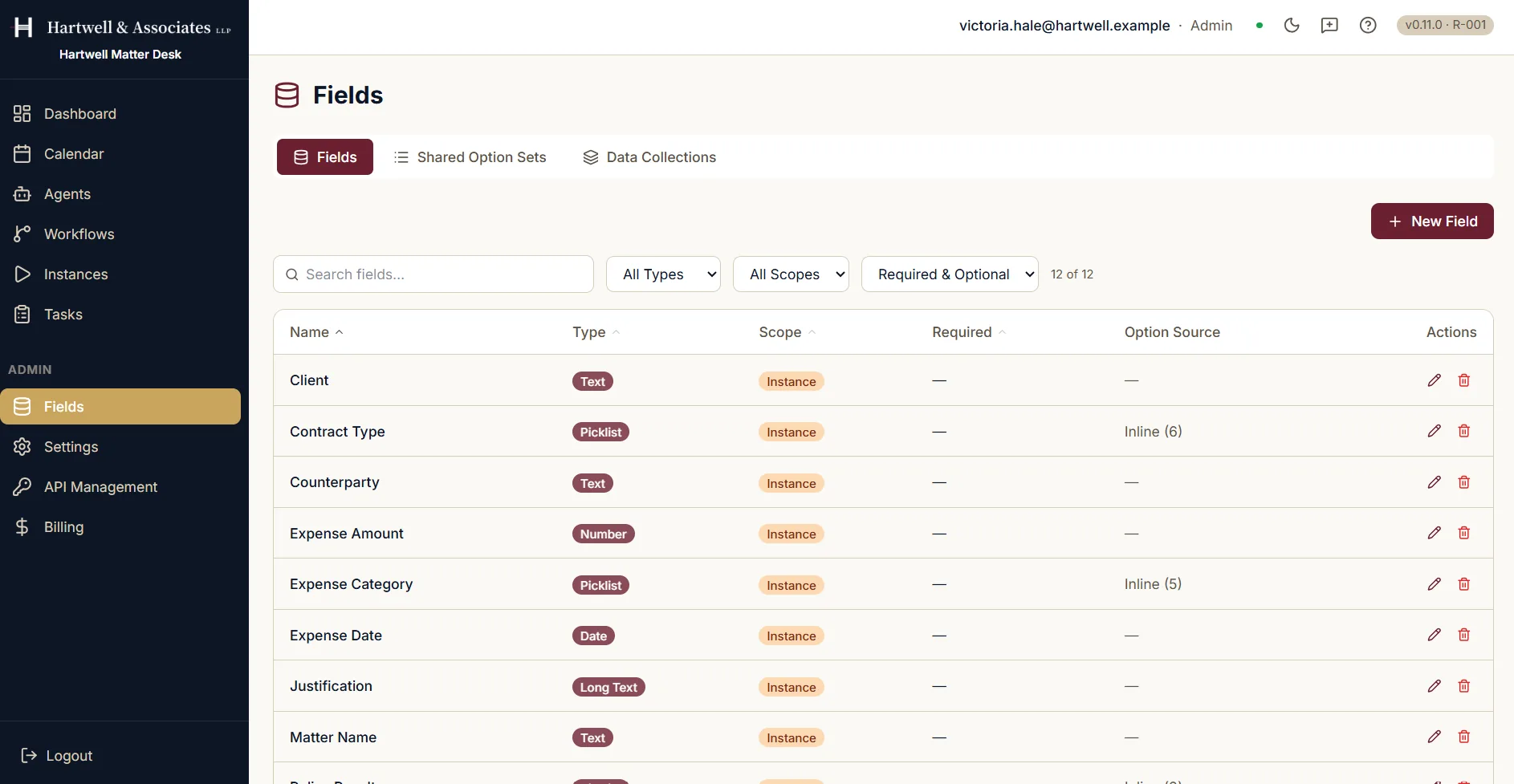
The admin Fields screen, reading twelve of twelve, listing custom fields including Client, Contract Type, Counterparty, Expense Amount, Expense Category, Expense Date, Justification and Matter Name. Each row shows the field's type, whether that is text, picklist, number, date or long text, its scope, whether it is required, and where its options come from. Tabs above offer Fields, Shared Option Sets and Data Collections, beside filters for type and scope and a New Field button.

The Fields screen, with each field's type, scope and option source. Demo workspace with example data.

Where to go next

Written against the product itself. The in-product help centre is the fuller reference for everything around this screen. For how to raise anything this guide does not cover, see the Support Hub.
Create a Custom Field in Dave: A Quick Reference Guide | Dave